Vocal chain · 7-day trial
Nine processes for one voice, in the order you use them
✓ Mac installers signed and notarized by Apple
Tuning, EQ, compressor, de-esser, chorus, width, delay, reverb and limiter. Inside one plugin, already chained. One payment, permanent licence.
Free 7-day trial Buy it — €96.80 incl. taxes
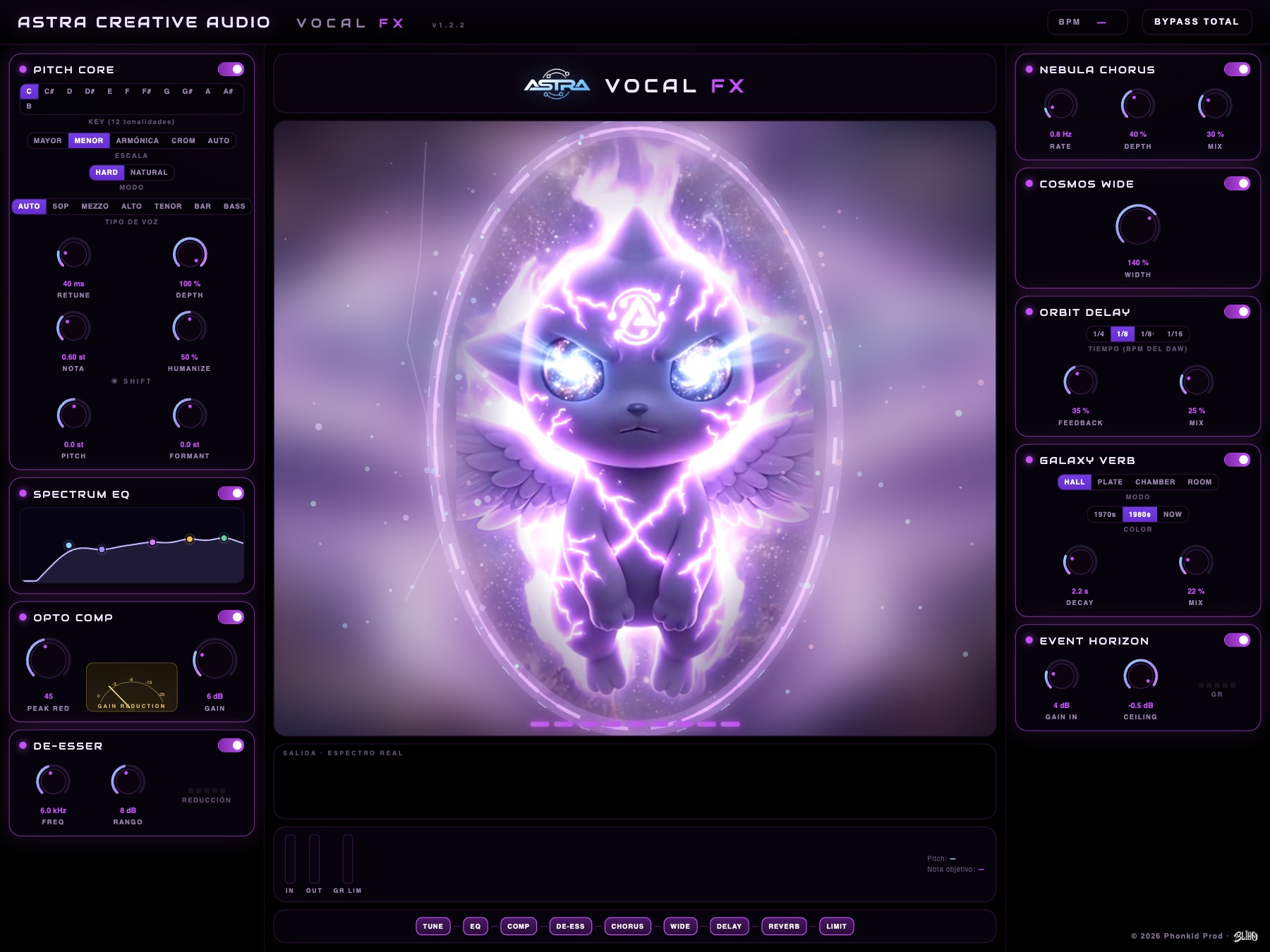
What it is
A vocal chain, already built. Instead of lining up nine plugins and arguing with the order, you get them in one, placed the way they actually go: tune first, then clean, then compress, then decorate. Anything you don't want, you switch off.
TUNE → EQ → COMP → DE-ESS → CHORUS → WIDE → DELAY → REVERB → LIMIT
Hear it
The same take, with no volume change between versions: all four renders are matched to −18 LUFS, so what changes is the processing and not how loud it is.
Effect by effect
The modules one by one, with the controls exactly as they ship: this is what you hear if you open the plugin and press that button. The same take across all thirteen examples, matched to −18 LUFS, so what changes is the processing and not how loud it is. The voice is BLIKO's, from the track «Hazme Volar»; you can hear the tuner above, in «Hear it».
Rendered with the plugin's own engine, not imitated: the same code that runs inside your DAW. With every module off the output is bit-for-bit identical to the input, so anything you hear on top is put there by the plugin. Width sits after the chorus on purpose: it works on the side signal and a recorded voice is mono, so on its own it would have nothing to widen — compare it with the chorus, not with the dry take.
The delay's four divisions
The delay locks to your DAW's tempo. Here, at 99 BPM, the track's tempo.
Watch it wake up
Astrini lives in the plugin's display and changes with whatever you switch on. It is not decoration: it is the meter. Turn the modules on below and you will see exactly what you will see in your DAW — more powers, more light, and the aura growing until it opens all the way.
The measurements
Measured on 15 Sep 2026 on this Mac, with the bench the project itself ships and by running audio through the same code that runs inside your DAW. Not copied from anyone's documentation, and the method to repeat them is at the bottom.
The compressor, point by point
220 Hz sine, makeup at 0 and level measured in steady state. Below the threshold it does nothing; peak level is useless here because the attack is 10 ms and the first cycles get through uncompressed.
| Input (RMS) | Reduction |
|---|---|
| −43,0 dBFS | 0,0 dB |
| −33,0 dBFS | 0,0 dB |
| −27,0 dBFS | 0,0 dB |
| −21,0 dBFS | 0,3 dB |
| −15,0 dBFS | 4,6 dB |
| −9,0 dBFS | 9,0 dB |
| −6,0 dBFS | 11,1 dB |
The latency it reports to your DAW
Only the tuner introduces it; with the tuner off the chain measures zero latency. The value depends on the voice type you pick, because the shifter works in periods and a low voice has a longer one.
| Voice type | Reported latency |
|---|---|
| Soprano · Mezzo · Contralto · Tenor | 7,71 ms |
| Barítono | 8,10 ms |
| Auto | 9,00 ms |
| Bass | 9,10 ms |
Formants: ±6 semitones move the centroid from 610 Hz to 785 and to 511, with the pitch untouched. Universal (Intel y Apple Silicon) y AU VALIDATION SUCCEEDED in Apple's own test.
How to repeat them: the project ships the benches RTBench (CPU and missed blocks), LatTest (latency), ChainTest (that the plugin does not eat its own input) y
MapTest (the note map). The ones on this page also come from an offline renderer that pushes a WAV through
the real processor; the script is in
herramientas/medir_vocalfx.py.
If you sing or rap low, set this
Pick your voice type instead of leaving it on AUTO. In the selector, TENOR, BARITONE or BASS, whichever matches your range. It is one click and we recommend it to everyone.
Why. The tuner works in periods, and a low note has a longer period. AUTO has to serve any voice, so it spreads the margin across every range: from 110 Hz up it nails the latency (1.6 ms error), and below that it can drift to 16 ms. Tell it which voice you are and the margin narrows back to 1.6 ms.
We measured it on our own bench and we are telling you because we would rather you knew than find out mid-mix. We are tuning AUTO so it gets there on its own; when it does, the update reaches you at no cost.
The installers are not notarised by Apple: macOS will warn you the first time. The install page explains the exact route.
Try it
Try it free for 7 days, no card. The seven days start when you first open the plugin, not on a fixed date: whenever you take it, the week is yours in full. After that it is €96.80 incl. taxes, one payment and yours for good: a permanent licence and updates included. Not a subscription and it does not expire. And if you already have the Astra subscription, the A-Vocal FX is included from 19 October at no extra cost.
It goes through the store: both the trial and the purchase include macOS and Windows. When you buy, your licence key arrives by email and you can re-download it whenever you want.
Free 7-day trial Already tried it — buy for €96.80 incl. taxes
Formats and requirements
macOS: AU, VST3 and a standalone app. Universal, Intel and Apple Silicon, macOS 10.13 or later.
Windows: VST3, 64-bit.